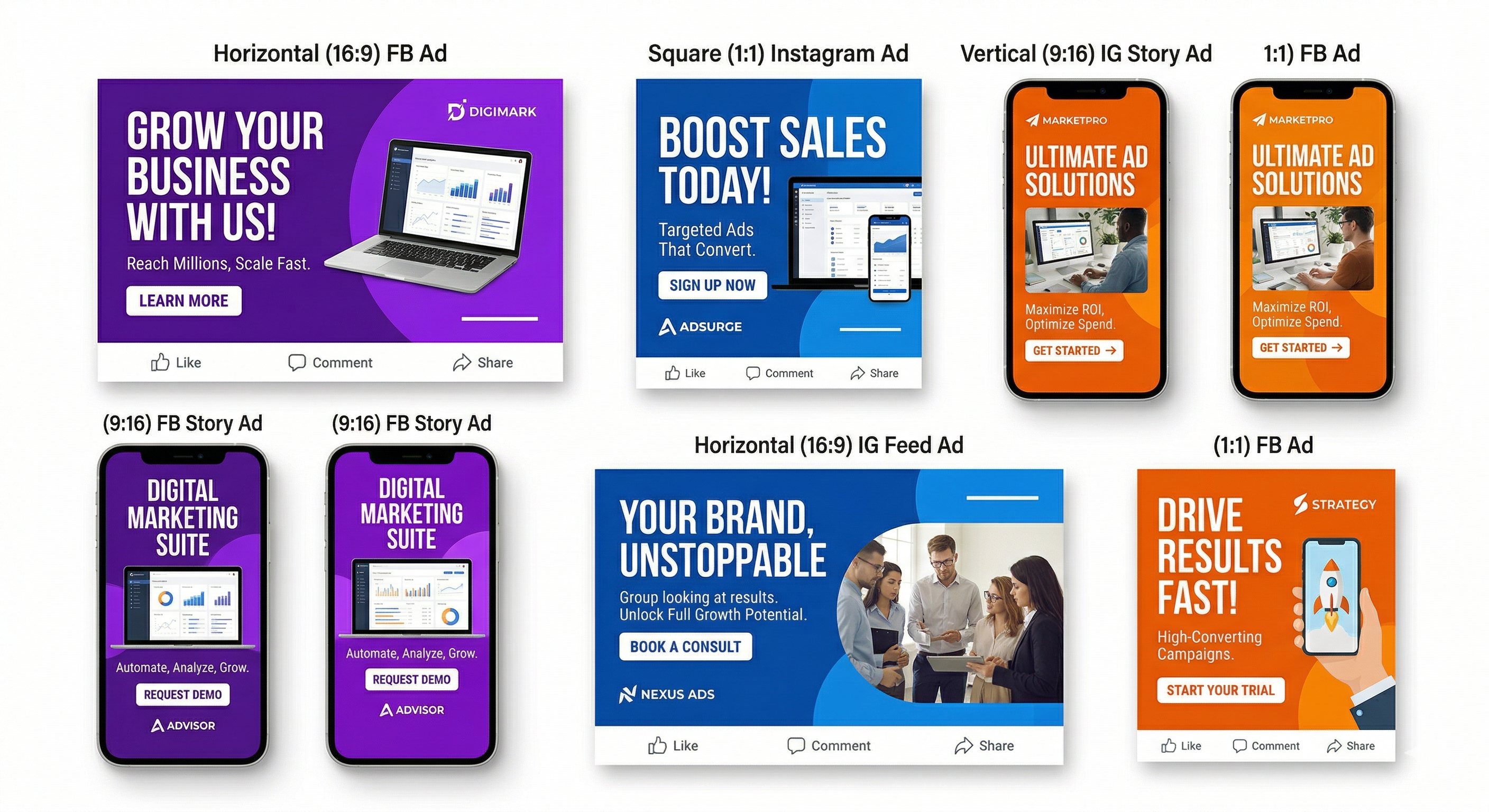
The #1 reason most Facebook ad accounts underperform isn't targeting, budget, or landing pages. It's creative fatigue — running the same 2–3 ad visuals until every person in your audience has seen them 15 times, and the algorithm stops showing them.
The fix is creative velocity: shipping new ad creatives faster than they fatigue. The problem? Traditional design workflows make this nearly impossible without a large budget. Waiting 3–5 days per creative, paying $200–$500 per design batch, and still not being able to test enough variations — this is why most small and mid-market accounts plateau.
This guide shows you exactly how to create professional Facebook ad creatives yourself — without any design skills, without Canva templates, and without a designer. The AI workflow below is what performance marketers use to produce 10x more creative variations per week while cutting CPA by 30–40%.
Why Most Ad Creatives Fail (And What Actually Works)
Before building the workflow, you need to understand what makes a Facebook ad creative actually convert. Most business owners make three consistent mistakes:
- Logo-first design. Leading with your logo is fine for brand awareness. For direct response, the first 1.5 seconds must communicate a benefit or trigger an emotion — not a brand name nobody recognizes yet.
- Too much text. Facebook's own research shows that ads with less than 20% text coverage consistently outperform heavy-text ads. White space and a single strong visual outperform information-dense collages in almost every category.
- One creative, zero learning. Running a single creative gives Facebook's algorithm nothing to optimize against. You need at least 3–5 variations per ad set to let the algorithm find who responds to which visual style, hook, and format.
The winning formula is a creative that does three things in under 2 seconds: stops the scroll (visual), surfaces the benefit (headline), and triggers a clear action (CTA). Everything else is noise.
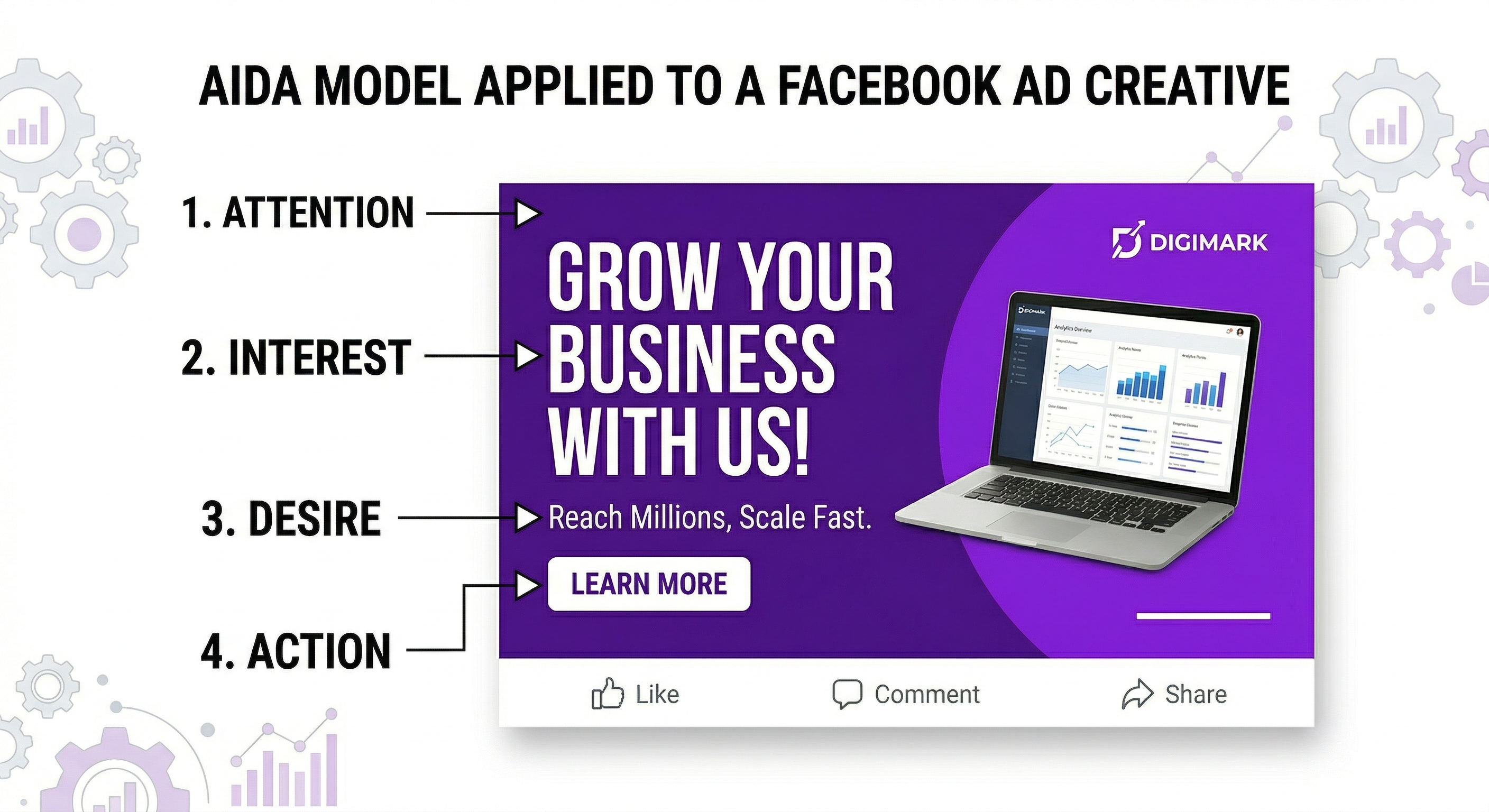
The AIDA Framework for Ad Creatives
Apply this to every ad creative you build
Step-by-Step: How to Create Facebook Ad Creatives Without a Designer
Define Your 3 Core Ad Creative Angles
Before generating anything, decide on three different angles — different emotional or logical reasons someone would buy. For example, for a fitness app: (1) the "save time" angle, (2) the "see results fast" angle, (3) the "do it from home" angle. Each angle appeals to a different segment of your audience and needs a different visual treatment.
Write one sentence for each angle: "This ad is for someone who [specific situation] and wants [specific outcome]." This sentence becomes your AI prompt.
Choose the Right Ad Size for Each Placement
Different placements need different sizes. The most important formats to produce for every campaign:
- 1200×628px — Facebook feed (desktop and mobile)
- 1080×1080px — Instagram feed and Facebook square format
- 1080×1920px — Instagram Stories and Facebook Stories
- 1200×1200px — Facebook right column and Marketplace
Most businesses only run one or two of these and miss huge amounts of cheap inventory. With an AI ad creative generator, all four sizes can be generated simultaneously from a single prompt — a process that would take a designer 2–3 hours.
Generate Creative Variations with AI
For each of your 3 angles, you want at least 2–3 visual variations. That gives you 6–9 total creatives to test — enough for the algorithm to find a winner without overspending in the learning phase.
Using Creatives Gen's ad creative generator: enter your brand name, describe the product/service, paste in your angle sentence, and select the ad sizes. The AI generates on-brand creatives with your color palette, a persuasive headline, and a CTA in 30 seconds per batch.
Vary: headline wording, background visual, color accent, and CTA text. Even small variations (changing the headline from a question to a statement) can produce 2–3x differences in click-through rate.
Structure Your Campaign for Creative Testing
The testing structure that maximizes learning while minimizing wasted spend:
- 1 campaign with campaign budget optimization (CBO) enabled
- 1 ad set per angle (so 3 ad sets for 3 angles)
- 2–3 ads per ad set using your visual variations
- Minimum $50/day total budget to exit the learning phase in 1–2 weeks
Let it run for 7–14 days without touching it. Facebook's algorithm will automatically allocate more budget to winning creatives. After 14 days, kill ad sets spending most budget on the worst CPA, and create new angle variations inspired by what the winner got right.
Read the Data and Iterate Fast
Three metrics tell you everything about creative performance:
- CTR (Link Click-Through Rate): Measures scroll-stop and headline pull. Under 0.8% = weak creative. Over 2% = strong. This is the creative metric.
- Hook Rate (3-second video views ÷ impressions): For video ads only. Under 25% = your first frame is failing. Over 40% = strong attention grab.
- CPA (Cost Per Acquisition): The only metric that ultimately matters. Optimize everything toward this number.
If CTR is high but CPA is bad, the creative is attracting the wrong people — adjust your targeting or your angle. If CTR is low, the creative itself needs work — test a new visual or headline.
The creative testing rule: Never judge an ad creative before it has 1,000 impressions. Early results are noisy. Facebook needs data volume before its algorithm can optimize delivery to the right people. Killing ads in the first 48–72 hours is one of the most expensive mistakes in paid advertising.
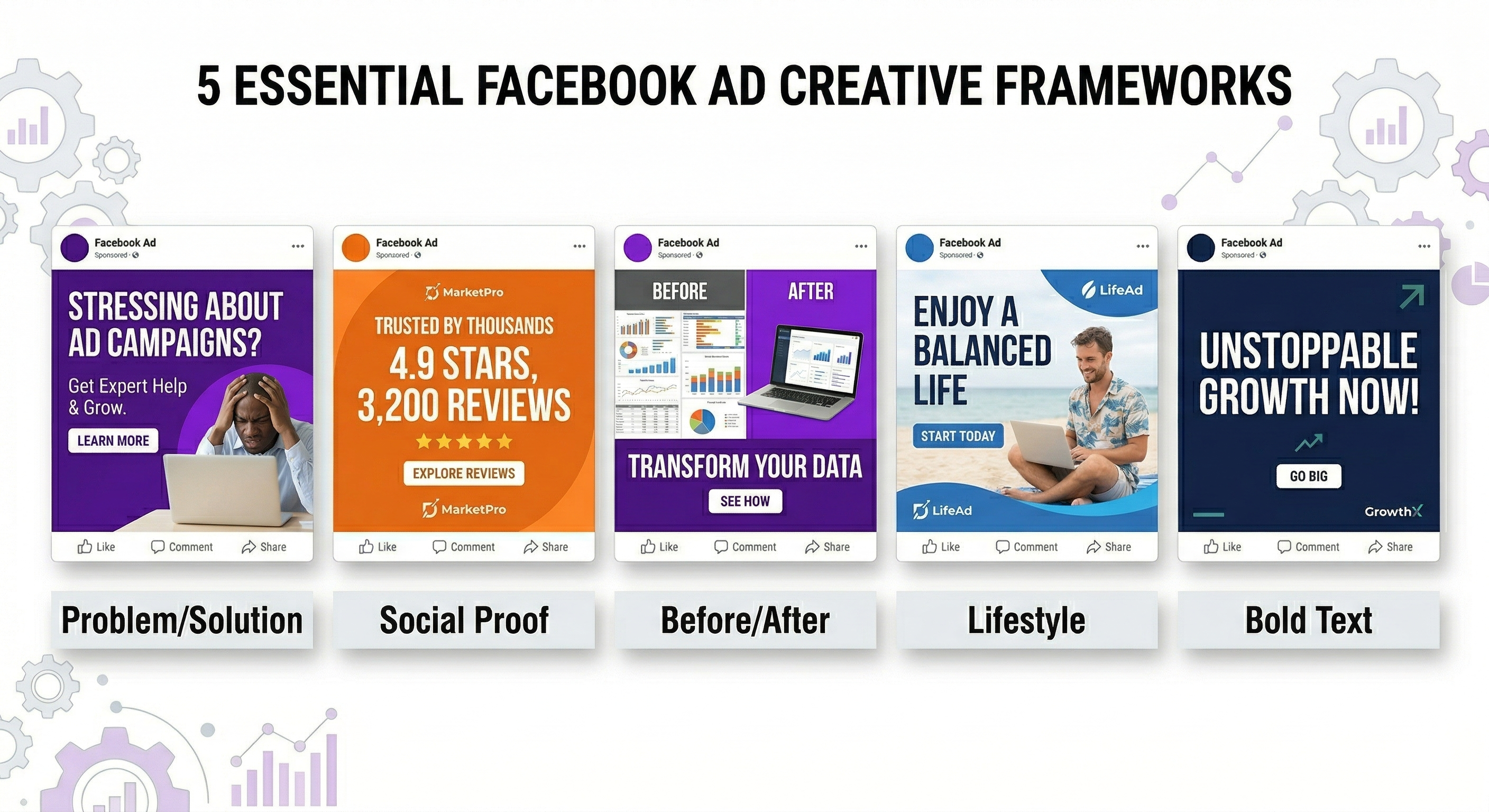
The 5 Facebook Ad Creative Formats That Convert Best in 2025
1. The "Problem → Solution" Static Image
Left side or top: the problem (shown visually or in text). Right side or bottom: your product as the solution. This format works in every industry because it aligns with how buying decisions are actually made — people recognize a pain point and look for the solution.
2. The "Social Proof" Number Ad
A large, bold number dominates the visual: "12,847 customers" / "4.9 stars from 3,200 reviews" / "Used in 47 countries." Social proof removes purchase anxiety. Numbers are more believable than superlatives. "Thousands" performs worse than "12,847."
3. The "Before / After" Split Creative
The most universally effective format for any product or service with a measurable result. The before/after format triggers the imagination — people mentally insert themselves into the "after" state. Works for fitness, skincare, business tools, interior design, financial services, and almost everything in between.
4. The "Lifestyle in Context" Photo
Your product shown in actual use in an aspirational context. Not a white-background product photo — a real scene where someone is using and benefiting from it. People buy outcomes, not products. Show the outcome visually.
5. The "Bold Statement" Text-Dominant Ad
A short, provocative headline at large font size over a high-contrast background. Works when you have a genuinely strong unique selling proposition: "The last password manager you'll ever need" / "Lose 12lbs without the gym" / "We write your social media content for you." If your USP is strong enough to stand alone as text, this format tests very fast because it's cheap to produce and iterate.
How AI Changes the Economics of Creative Testing
The fundamental problem with traditional creative production is that the cost per creative is high and the turnaround time is slow. This forces advertisers to run too few variations, which means Facebook has insufficient data to optimize, which means performance plateaus.
AI-generated creatives break this constraint. When you can produce a new on-brand ad creative in 30 seconds for essentially zero marginal cost, you can:
- Test 20 angles per month instead of 3
- Refresh fatiguing creatives weekly instead of monthly
- Generate all required ad sizes in one go instead of resizing manually
- React to seasonality, trends, and competitor moves in real time
The businesses seeing the best Facebook ad performance in 2025 are not the ones with the best targeting or the biggest budgets. They're the ones with the highest creative output — testing more angles, refreshing more often, and finding winning creatives faster than their competitors.
Start Testing Ad Creatives Today — Free
Generate your first batch of Facebook ad creatives in all sizes. 15 free images, no credit card, no design skills needed.
Try the AI Ad Creative Generator →Frequently Asked Questions
What size should Facebook ad images be?
The recommended sizes are 1200×628px for the news feed, 1080×1080px for square format (works on both Facebook and Instagram), and 1080×1920px for Stories. Always use high-resolution images (minimum 1080px wide) and keep file size under 30MB. With an AI ad creative generator, all sizes can be produced simultaneously from one prompt.
How much text is allowed on Facebook ads?
Facebook removed the strict 20% text rule in 2020, but their algorithm still penalizes text-heavy images with reduced delivery. The best practice is to keep image text to a short headline and CTA — put longer copy in the ad text field above the image, not overlaid on it.
How many ad creatives should I test at once?
Start with 6–9 creatives across 3 angles. This gives the algorithm enough variation to find winners without diluting your budget so much that nothing gets statistical significance. Once you identify a winning angle, scale that ad set and introduce new creative variations within it.
Can I use AI-generated images for Facebook ads?
Yes. Meta's ad policies do not prohibit AI-generated images as long as they don't violate other policies (no deceptive claims, no prohibited content categories, etc.). AI-generated ad creatives are used extensively by performance marketing teams and agencies. The quality of modern AI image generators is sufficient for high-converting ads.
How often should I refresh Facebook ad creatives?
Monitor your frequency metric (average times each user has seen the ad). When frequency exceeds 3–4, performance typically drops. In a small, retargeting audience this can happen in 1–2 weeks. In a broad prospecting audience, you might run the same creative for 4–6 weeks. The practical answer: refresh creatives when CTR drops more than 30% from its peak.